Effect
Liquid glass touch illumination
Pressing glass lights it from under the finger: a soft white glow starts at the touch point, spreads through the body and fades when released; glass right beside it catches a faint share of the same light on the side facing the touch.

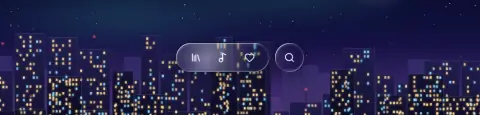
- Use in
- Interactive glass on touch screens: buttons, tab bars, sliders, segmented controls, cards that open on tap. One touch at a time.
- Avoid
- Coloured or neon glows; light that stays after release; lighting non-interactive glass; a glow so bright that labels on the glass lose contrast.
Parameters. glow white 30–40 % at the touch point, radius growing to about 1.5 × the body over 250 ms, fade 300 ms after release; neighbours within the merge spacing (24 px) get 20–30 % of it from the near side; works with the press scale (1.03–1.06) and +15 % bend.
How it is built
- Design tool
- A radial gradient layer (white 35 % → 0) clipped to the body, centred on the touch point, on the pressed state's frame; a second at 25 % strength on the neighbour's facing edge.
- Web
- A .glass__light layer with a radial gradient at the pointer position, shown on pointerdown and faded on release; nearby glass gets the same at a quarter strength (web recipe section F, touchLight()).
col += white * strength * smoothstep(r, 0.0, distance(px, touch)) inside the body; r grows over the press; neighbours use the same with strength × 0.25.Questions
Where should touch illumination be used?
Interactive glass on touch screens: buttons, tab bars, sliders, segmented controls, cards that open on tap. One touch at a time.
When should touch illumination be avoided?
Coloured or neon glows; light that stays after release; lighting non-interactive glass; a glow so bright that labels on the glass lose contrast.
How is touch illumination built on the web?
A .glass__light layer with a radial gradient at the pointer position, shown on pointerdown and faded on release; nearby glass gets the same at a quarter strength (web recipe section F, touchLight()).