Effect
Liquid glass background extension
Content next to a floating sidebar or inspector continues under it as a mirrored, heavily blurred copy of its own edge, so the glass bends a continuation of the hero instead of a hard cut or a flat page colour.
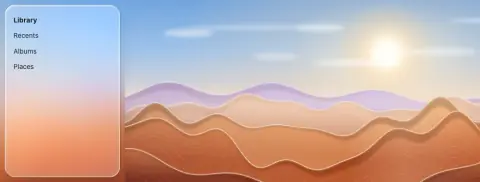
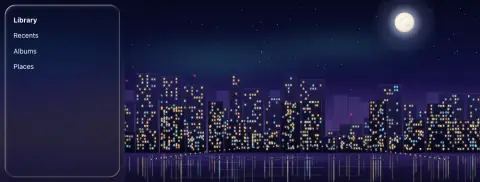
- Use in
- Split views with a floating sidebar or inspector beside an edge-to-edge hero: product pages on tablets and desktops, photo and media detail views, maps beside a panel.
- Avoid
- Under full-width content (it only fills the strip under the sidebar); a sharp mirror image (the seam must read as soft light); using it on phones where the bars float over the content itself.
Parameters. copy the hero's 80–160 px next to the sidebar edge, flip it horizontally at the seam, blur 24–40 px, saturate ×1.1–1.2; it fills the sidebar's footprint only; the sidebar's own optics then apply as usual.
How it is built
- Design tool
- Duplicate the hero image, flip it horizontally, align its edge to the seam, mask it to the sidebar's area and add Layer blur 32; keep the sidebar's Glass effect above it.
- Web
- An element under the sidebar with the hero as its background at the hero's own size, flipped with scaleX(−1) about the seam, filter: blur(32px) saturate(1.15) (web recipe section G). SwiftUI: .backgroundExtensionEffect() on the hero inside the split view.
For px under the sidebar: sample the hero at (seam + (seam − px.x), px.y) with a wide blur (or a pre-blurred mip), then run the sidebar's bend over that.Questions
Where should background extension be used?
Split views with a floating sidebar or inspector beside an edge-to-edge hero: product pages on tablets and desktops, photo and media detail views, maps beside a panel.
When should background extension be avoided?
Under full-width content (it only fills the strip under the sidebar); a sharp mirror image (the seam must read as soft light); using it on phones where the bars float over the content itself.
How is background extension built on the web?
An element under the sidebar with the hero as its background at the hero's own size, flipped with scaleX(−1) about the seam, filter: blur(32px) saturate(1.15) (web recipe section G). SwiftUI: .backgroundExtensionEffect() on the hero inside the split view.