Component · overlay (over a dimmed world)
Liquid glass control module
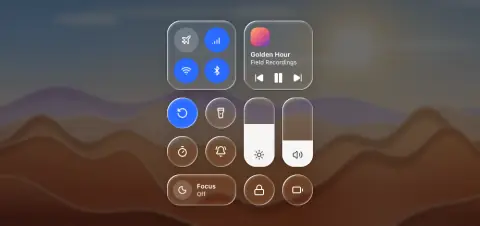
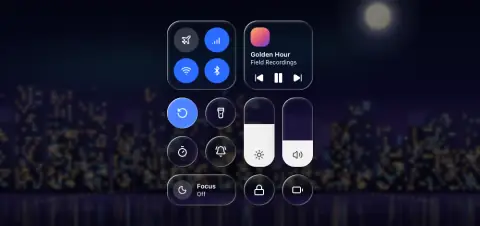
Quick settings tiles: round toggles, labelled tiles, level sliders and a media tile over the dimmed system.
- Material
- lens (clear), one body per tile
- Profile
- convex (1×1 circles) · bevel (tiles and sliders)
- Bezel (px)
- 1×1: = radius (32) · tiles: = corner radius (26–28)
- Displacement (px)
- 0.5 × radius (16) · 0.4 × bezel (10.5–11)
- Blur (px)
- 0.5–1
Geometry. a 64 px grid unit with 16 px gaps (four columns: 304 wide); 1×1 round toggle 60–64; 2×1 tile 144 × 64, radius 22–26 (26); 2×2 tile 144², radius 26–28 (28); tall slider 64 × 144, radius 22–26 (26); flat round buttons inside a tile 52 (2×2) or 40 (2×1); artwork radius = tile radius − inset (14 at inset 14); glyphs 22–24; labels 13–14 weight 600 over a state line 12
Rules4
- Each tile is its own glass body, 16 px from the next (never under 8); no glass panel behind the grid and no glass buttons inside a tile: inner buttons are flat (solid accent on, white 18 % off).
- Labels only on 2×1 and larger tiles; 1×1 toggles and sliders carry an accessible name and no visible label.
- Glyphs and labels are white in both themes; raise the dim until labels reach 4.5:1 over the brightest wallpaper (55–60 % over a light sky).
- The slider level is a flat fill clipped by the tile's corners; it never refracts.
Anatomy6
- the world behind dimmed (black 55–60 % light / 50 % dark) and blurred 2–4 px
- separate clear-glass tiles, no glass panel behind the grid
- 1×1 round toggles: a white glyph, no label
- 2×1 tile: a flat round button, then the label and its state
- 2×2 tiles: four flat round buttons, or artwork, title and flat transport glyphs
- tall slider: a flat white fill rising inside the glass, the glyph at the bottom
States4
- toggle off: clear glass, white glyph
- toggle on: accent-filled (#2B6BFF in both themes) with a white glyph; rim and edge line stay
- slider: the fill follows the finger; the glyph turns dark (#1D1D1F 82 %) where the fill covers it
- press: a tile grows 1.05
Questions
What material is a liquid glass control module?
Lens (clear), one body per tile material with a convex (1×1 circles) · bevel (tiles and sliders) edge profile, in the overlay (over a dimmed world) layer. Quick settings tiles: round toggles, labelled tiles, level sliders and a media tile over the dimmed system.
How big is a liquid glass control module?
A 64 px grid unit with 16 px gaps (four columns: 304 wide); 1×1 round toggle 60–64; 2×1 tile 144 × 64, radius 22–26 (26); 2×2 tile 144², radius 26–28 (28); tall slider 64 × 144, radius 22–26 (26); flat round buttons inside a tile 52 (2×2) or 40 (2×1); artwork radius = tile radius − inset (14 at inset 14); glyphs 22–24; labels 13–14 weight 600 over a state line 12.
What bezel, displacement and blur does it use?
Bezel 1×1: = radius (32) · tiles: = corner radius (26–28); displacement 0.5 × radius (16) · 0.4 × bezel (10.5–11); blur 0.5–1 (px).
Which states does a liquid glass control module need?
Toggle off: clear glass, white glyph; toggle on: accent-filled (#2B6BFF in both themes) with a white glyph; rim and edge line stay; slider: the fill follows the finger; the glyph turns dark (#1D1D1F 82 %) where the fill covers it; press: a tile grows 1.05.